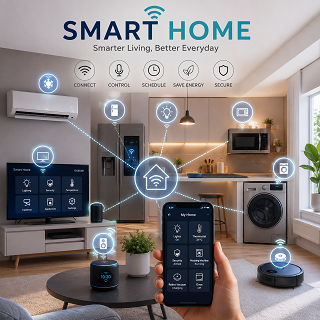
Smart Home Solutions for HDB Living in Singapore: A Complete Guide to Security, Convenience, Energy Savings, and Modern Living
This isn’t about turning your HDB flat into a sci-fi movie set-it’s about real, practical upgrades that save money, keep your family safe, and cut down on daily hassles. You don’t need a mansion to go smart… just a few well-chosen devices that actually work in Singapore’s compact homes.
And yes-some gadgets are total gimmicks. But others? They alert you if someone’s at your door while you’re at work, or shut off appliances during a power spike-potentially preventing a fire. That’s not convenience. That’s peace of mind.
View Products & Guides
You’re living in one of the most tech-forward cities on earth. So why should your flat feel stuck in 2005?
What’s actually out there? The types of smart gear you’ll want for your flat
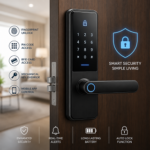
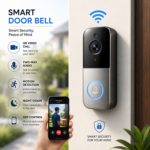
- Smart locks and video doorbells that let you see who’s at your door-even if you’re at the hawker centre
- Wi-Fi-enabled lighting systems you can dim or turn off from bed (or from Bali)
- Smart air-con controllers that fire up the cool air before you walk in
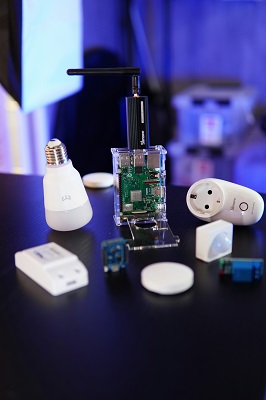
- Universal hubs that connect all your devices so they actually work together
- Energy-monitoring plugs that show you exactly what’s sucking power when you’re not looking
| Device Type | Key Benefit |
| Smart Locks | No more lost keys-unlock with your phone or PIN |
| Video Doorbells | See and speak to visitors remotely, day or night |
| Smart Lighting | Set schedules, dim lights, save energy effortlessly |
| AC Controllers | Pre-cool your flat, avoid walking into a sauna |
Smart locks and doorbells for that peace of mind
You’re juggling groceries and your kid’s school bag when the doorbell rings-no problem, you check your phone and buzz in your neighbour. With a smart lock and video doorbell, you’re never blind to who’s outside. You can even grant temporary access to cleaners or relatives. This
Lighting and air-con controls that’ll save your life
Ever walked into a sweltering flat after work and immediately regretted everything? Smart air-con controllers fix that. Pair them with automated lighting, and your home greets you just right. You’ll cut bills and never forget to switch off the fan again. This
Because you can schedule your lights to turn on at sunset or when you leave the office, your flat feels lived-in-even when it’s not. The real win? Linking your air-con to motion sensors or geofencing so it only runs when you’re actually home. Some models even track your usage and suggest better settings. You’re not just saving energy-you’re building habits without lifting a finger.
All-in-one hubs to keep everything talking to each other
Imagine your lights dimming when your movie starts or your air-con adjusting when you lock the door. That kind of magic needs a central brain. A smart hub connects your devices across brands so they respond to one command. No more juggling five apps. This
Without a hub, your smart gear might as well be speaking different languages. But once you plug in a central system-like Apple Home, Google Home, or Samsung SmartThings-your devices start working as a team. You can create routines like “Good Morning” that turns on lights, adjusts the temperature, and reads the news. It’s not just convenient-it’s how a real smart home should feel.
View Products & Guides
Before you buy anything, let’s talk about the factors that actually matter
- You need reliable Wi-Fi – not just speed, but consistent coverage across your HDB flat
- Choose devices with compatible ecosystems – mixing brands can lead to frustrating glitches
- Consider power consumption – some gadgets drain energy even when idle
- Look for local support and warranty – Singapore-based service means faster fixes
- Think long-term: will this device still get software updates in two years?
This shapes whether your smart home feels like magic or a mess.
Figuring out if your HDB’s Wi-Fi can even handle it
You’ve probably had that moment – buffering in the middle of a movie, or your phone dropping signal near the bathroom. If your Wi-Fi struggles with streaming, it’ll choke on smart devices. Most HDB flats have dead zones, especially with thicker walls between rooms. Test your signal strength where you plan to install gadgets. Weak connectivity means unreliable automation – your lights might not respond, or your camera could go offline. This could leave you blind when it matters most.
Making sure your gadgets don’t fight with each other
So you bought a smart bulb from one brand and a voice assistant from another – now they won’t talk. It happens more than you think. Some devices use Zigbee, others Wi-Fi, and a few still rely on Bluetooth. When they don’t share the same language, you end up with a digital tower of Babel. Clashing protocols mean broken routines – like your AC turning on but the blinds staying shut. This creates more hassle than help.
Imagine setting a “Good Morning” scene that turns on lights, adjusts the fan, and unlocks the door – but only half of it works because one device rejected the command. That’s not convenience, that’s frustration. Different brands often guard their systems like kingdoms, refusing to play nice unless they’re on the same app or hub. You might think you’re saving money with a cheaper gadget, but if it doesn’t integrate, you’ll end up replacing it later. Interoperability isn’t optional – it’s the backbone of a working smart home. This decides whether your system flows smoothly or falls apart at the first command.
The real deal: Is a smart home honestly worth the headache?
You’ve seen the glossy ads-lights turning on by voice, doors unlocking with a tap, AC switching on before you even step inside. But here’s the real question: does all that tech actually make your HDB life better-or just more complicated? It’s not just about cool gadgets; it’s about whether they genuinely improve your daily routine without driving you up the wall with glitches and updates.
Why I think the convenience is a total game-changer
Imagine walking into your HDB flat after a long day and the lights gently come on, your favourite playlist starts, and the fan’s already spinning at the perfect speed-all without lifting a finger. That kind of effortless control isn’t just flashy, it reshapes how you experience your home. Once you’ve lived with it, going back feels like downgrading from express MRT to a trishaw.
The annoying bits like battery life and tech glitches
Let’s be real-nothing kills the mood like your smart lock beeping at 2 a.m. because the batteries died. Or your voice command getting ignored because the Wi-Fi hiccuped. These hiccups might seem small, but when they happen at the worst time, they’re infuriatingly disruptive. And yes, you’ll still need to remember to charge things-ironic, right?
Some devices guzzle batteries like Singaporeans at a buffet-motion sensors, door locks, even smart remotes can need replacements every few months. Miss a warning alert, and you’re locked out or stuck in the dark. Then there’s the occasional firmware update that messes with settings, or your phone app suddenly not syncing. Sure, most issues are fixable, but they do chip away at the promised “set and forget” dream. You’re not just buying hardware-you’re signing up for light tech maintenance.
Here’s how you actually set this stuff up without losing your mind
You’ve seen the ads, scrolled past the smart home hauls, maybe even bought a gadget or two that now collects dust. But setting up a real, working system in your HDB flat? That’s a different story. It doesn’t have to be overwhelming-start simple, build smart, and actually use what you install. No PhD required.
View Products & Guides
Starting small with the basics first
What’s the easiest way to not quit before you begin? Begin with one thing-just one. A smart plug or motion-sensing bulb is enough. Plug it in, connect it to your phone, and get comfortable turning something on remotely. That tiny win builds confidence-and trust us, you’ll want that before exploring into automations.
Getting your voice assistant to actually listen to you
Why does your speaker keep ignoring you? It might not be listening at all. Make sure it’s plugged in, online, and the mic isn’t muted. Say the wake word clearly-“Hey Google” or “Alexa”-and avoid background noise like the TV. If it still ghosts you, retrain the voice model in the app. Seriously, it helps.
Let’s be real-your voice assistant isn’t psychic. It needs to learn how you talk. In the Google Home or Alexa app, there’s a feature that lets you record sample phrases. Do it. The more it hears your accent, tone, and quirks, the better it responds. And if you live in a small HDB flat, placement matters: keep it central, off the floor, and away from echoey corners. One misplaced speaker = constant “I didn’t catch that”-don’t let that be you.
Setting up those sweet ‘Good Morning’ routines step-by-step
Want your home to wake up with you-not just your phone? Start by asking your voice assistant to “set up a morning routine.” You’ll pick actions like turning on lights, reading the weather, or playing your news playlist. The magic happens when it all runs with one command. Even better? Automate it by time or sunrise. Boom-effortless mornings.
Think of your “Good Morning” routine like a playlist for your day. You decide what happens and when. Below is a simple breakdown to get it right-no guesswork.
| Action | What to Do |
|---|---|
| Choose your trigger | Say “Good morning” or set it to activate at 7:00 AM |
| Pick your lights | Select which bulbs turn on-and at what brightness (start dim!) |
| Add audio | Play weather, traffic, or a chill playlist-your call |
| Include smart blinds? | If you have them, schedule a slow open-no harsh sunlight shocks |
| Test it | Run it manually first-tweak until it feels just right |
Once it works? You’ll wonder how you ever got out of bed without it. And hey-if you mess up the first time, no big deal. These systems are forgiving. Just go back, edit, and try again. The goal isn’t perfection-it’s making your HDB flat work for you, not the other way around.
My take on slashing those scary SP Group bills with smart tech
You’re not imagining it-those monthly electricity statements *are* creeping up. But here’s the good news: you don’t need to live in the dark or sweat through Singapore’s humidity to save. Smart home tech gives you control, not sacrifice. And the best part? Most of it pays for itself in under a year.
Using sensors so you don’t leave the lights on like a blur sotong
You’ve walked into a room, flipped the switch, then zoned out-next thing you know, it’s 3 a.m. and the living room’s still lit like a concert stage. Motion sensors fix that. They turn lights off automatically when no one’s around, so you’re not paying to illuminate empty spaces. It’s not magic-just smart timing.
Tracking your power usage so you know where the money’s going
You wouldn’t spend $500 a month on food without checking receipts-so why do it with electricity? Smart plugs and energy monitors show you exactly which devices guzzle power, down to the watt. That old fridge? The AC you left on “just in case”? They’re not invisible anymore.
Think of it like a fitness tracker-but for your electricity. You start seeing patterns: the TV on standby sipping energy all night, the water heater kicking in during peak hours. Once you spot the leaks, you plug them. Some monitors even send alerts when usage spikes-catching a malfunctioning appliance before it racks up a $200 bill. Knowledge isn’t just power. In this case, it’s savings.
Seriously, how do we keep our HDBs safe from more than just porch pirates?
Security isn’t just about catching package thieves on camera anymore – it’s about layered protection that works even when you’re not home. Burglaries may be rare, but opportunistic break-ins still happen, especially in older blocks with less foot traffic. You need a system that deters, detects, and responds – not just records. And yes, that means going beyond stickers and grilles.
View Products & Guides
Setting up cameras that won’t annoy your neighbors
Pointing a camera straight into your neighbor’s living room? Yeah, that’s a fast track to passive-aggressive notes in the lift. Most HDB corridors are tight, so angle matters – a lot. Use wide-angle lenses focused on your door, not shared spaces. And never record audio – it’s illegal without consent. Keep it discreet, respectful, and actually useful.
Keeping your home network locked down tight
Think your smart lock is secure? Not if your Wi-Fi password is “password123”. Hackers don’t break windows – they exploit weak networks. Every connected device is a potential backdoor. If your router’s still using the default login, you’re basically leaving your digital keys under the mat.
Start by changing your router’s admin credentials – not just the Wi-Fi name and password. Enable WPA3 encryption if your router supports it. Disable remote management unless you absolutely need it. Update firmware regularly; manufacturers patch security holes all the time. And segment your network: put cameras and smart plugs on a guest network so a hacked bulb can’t give access to your laptop. Because yes – that’s a real attack vector. Your smart home should protect you, not expose you. A single weak device can compromise your entire setup, so treat every gadget like it’s connected to your bank account – because in a way, it is.
Final Words
So you’re living in an HDB and thinking smart home tech is just for fancy condos? Think again. You’ve got access to affordable, easy-to-install systems that lock down security, cut your bills, and make daily life way smoother. From motion-sensing lights to remote-controlled air-con – it’s all within reach. You don’t need a mansion to live like you’re in the future. And honestly, once you go smart, you’ll wonder how you ever managed without it.
View Products & Guides
Smart Homes - Guides

Smart Homes - Products
FAQ
Q: Can I even install smart home devices in my HDB flat?
A: Yes, absolutely – and more people are doing it than you think. HDB doesn’t ban smart home tech, as long as you’re not drilling into load-bearing walls or rewiring the electrical system. Most smart devices are wireless, plug-and-play, or use adhesive mounts. Think smart lights, motion sensors, Wi-Fi cameras, voice assistants – all totally doable. You just can’t hack into the main electrical panel or run exposed cables through common corridors. So yes, you can go full smart mode – just keep it within HDB’s renovation guidelines.
Q: What’s the cheapest way to start with smart home tech in Singapore?
A: Start with a smart speaker and a few smart plugs – that’s your gateway drug. Seriously. Grab a budget-friendly Google Nest Mini or a Xiaomi smart speaker, pair it with $15 smart plugs from Shopee, and boom – you can turn lamps or fans on/off with your voice. No rewiring, no electrician, no drama. And once you see how easy it is to say “Hey Google, turn off the living room fan,” you’ll want more. It’s like giving your flat a brain – one that listens.
Q: Are smart security systems worth it for HDB flats?
A: If you’ve ever left the house and wondered, “Did I lock the door?” – yes, they’re worth it. Smart door locks like the Aqara or Yale keyless models let you lock/unlock via app or fingerprint. No more juggling keys or hiding them under the mat. Pair that with a video doorbell – like the Eufy or Ring – and you’ll know who’s at your door even if you’re at the hawker centre. And here’s the real win: you get alerts if someone lingers at your door too long. Peace of mind isn’t just for landed homes.
Q: Will smart devices actually help me save on electricity bills?
A: They can – but only if you use them right. Leaving fans or lights on all day? A smart plug can cut that habit fast. Set schedules: “Turn off the study lamp at 11 PM” or “Only power the TV on weekends.” Add a smart aircon controller like the Sensibo – it learns your habits and turns off the AC when you leave. One family in Tampines cut their monthly bill by $40 just by automating their AC and lights. It’s not magic – it’s just paying attention.
Q: Do I need a hub for my smart home setup?
A: Not always – but it depends on what you’re using. If you’re sticking to Wi-Fi devices (like smart bulbs from TP-Link or Google-compatible plugs), you’re fine without one. But if you want sensors, automations, or Zigbee devices (like Aqara motion sensors or door contacts), you’ll need a hub. The Aqara Hub or Samsung SmartThings work well here. Without a hub, your devices are like people shouting in different languages – they don’t talk to each other. With one, they actually work as a team.
Q: Is my data safe with all these smart devices?
A: That’s a fair concern – because no, not all brands are equal when it comes to privacy. Some budget cameras from unknown brands might send your video feed to servers in places you’ve never heard of. Stick to reputable brands like Google, Eufy, Aqara, or TP-Link – they encrypt your data and let you control sharing. And for goodness’ sake, change the default passwords. Use two-factor authentication where possible. Your smart home shouldn’t be a hacker’s playground.
Q: Can I control everything from one app, or will I go crazy switching between five?
A: You *can* have one app – but only if you plan ahead. Google Home and Apple Home are your best bets for central control. Set up your devices under one ecosystem, and you can say “Hey Google, goodnight” to shut off lights, lock doors, and arm sensors all at once. But if you mix too many random brands that don’t play nice? Yeah, you’ll end up with five apps. Pick a team early – Google, Apple, or Alexa – and stick with it. Life’s too short for app overload.