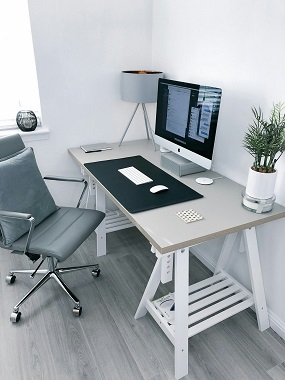
Space is tight, but working from home isn’t going away – and more HDB owners are turning corners, spare nooks, and even dining areas into functional workspaces. You don’t need a big flat to have a productive setup… but you do need smart planning. Without it, your focus – and your back – will pay the price.
So, how do you fit a desk, chair, and enough light to stay sane in under 100 sq ft? It’s not about size – it’s about clever choices. Picking the wrong spot or bulky furniture can make your flat feel cramped and your workday exhausting.
But get it right? You’ll have a space that’s calm, efficient, and actually yours – even if it shares duty with the dinner table.
Figuring out where the desk actually goes
Space is tight, but that doesn’t mean you can’t carve out a functional work zone. You’ll need to look beyond the obvious spots and consider how you actually use your flat. Every inch counts – even a sliver beside the entrance can become a micro workstation. Think about light, noise, and how often you’ll walk through the area. The best spot isn’t always the biggest – it’s the one that keeps you focused without disrupting daily life.
Why I think the living room corner is a winner
People assume the living room is too distracting for work – but that’s not always true. If you pick a quiet corner near natural light, you’ve already won half the battle. You’re close to power outlets, away from the bed’s sleepy vibes, and still part of the home’s rhythm. Just face away from the TV and use a room divider if needed. Honestly, it’s easier to switch off when work lives in a defined zone – even if it’s just a nook.
The real deal about using your bedroom space
Yes, you *can* work from your bedroom – but it comes with strings attached. Mixing sleep and work in one room blurs boundaries fast. You might find yourself answering emails in bed or struggling to wind down. It feels convenient now, but long-term? Not ideal. Still, if it’s your only option, make it work – just be intentional about it.
Let’s be real – not everyone has the luxury of a spare room. So when you’re stuck using your bedroom, the key is separation. Use a folding desk that tucks away, or position your setup opposite the bed – never facing it. Light matters too; avoid dim, cozy lamps and go for something bright and task-focused. If you don’t create a visual and mental break between work and rest, burnout creeps in quietly… and before you know it, your sanctuary feels like a cubicle.
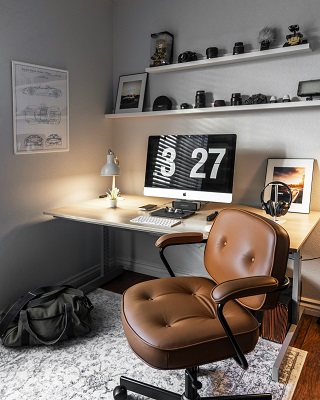
Lighting is honestly everything for your focus
You’d be amazed how much your energy shifts with just a change in light. Harsh overhead bulbs make your eyes tired, while soft, layered lighting keeps you sharp and calm. Natural light? That’s the golden ticket. It resets your brain like a morning walk-even if you’re stuck at your desk. The right lighting doesn’t just help you see-it helps you think clearly and stay on track without burning out.
Tips for getting that natural light just right
Big windows are great, but in a small HDB flat, you’ve got to work smarter. Position your desk near the window, but not blocking the flow. Use sheer curtains-they let in light without turning your screen into a mirror. Keep surfaces light-colored to bounce the daylight around.
- Place your desk perpendicular to the window to maximise light without glare
- Swap heavy drapes for light-filtering blinds or rice paper panels
- Use a mirror opposite the window to reflect and amplify daylight
The smartest setups make the most of every sunbeam-even on cloudy days.
What’s the best way to handle glare on your screen?
You’ve probably squinted at your laptop like it personally offended you. Glare turns your screen into a sunlit mess, and no amount of squinting fixes it. Adjust your monitor angle or use a matte screen protector. Close blinds during peak sun, but don’t kill the light entirely. The best fix is positioning-simple, but game-changing.
Think of your screen like a mirror-whatever light hits it, reflects back at you. If your desk faces the window head-on, you’re fighting glare all day. Instead, angle your monitor so sunlight hits the side, not the face. A hooded cap over your screen works wonders, or go old-school with a folded cardboard shade (hey, if it works…). And if you’re using artificial light, make sure lamps aren’t shining directly onto your screen. The last thing you need is a double dose of glare-from outside *and* your desk lamp.
My take on keeping the clutter under control
Most home offices in HDB flats start clean but end up buried under papers, chargers, and random knick-knacks in weeks. You’re not alone if your desk doubles as a dumping ground by Friday. The key? Build habits that match your real life – not some Instagram-perfect fantasy. Consistency beats perfection every time. The
How to hide those annoying cables and wires
Over 70% of visual clutter in small workspaces comes from tangled cords snaking across desks and floors. Use adhesive cable clips or a simple fabric sleeve to bundle them neatly. You can even route them behind furniture or along baseboards. And yes – that ugly power strip can live under the desk, not on it. The
Factors to consider when picking your storage bins
- Size – pick ones that fit your shelves without wasting space
- Material – fabric bins breathe better, plastic wipes clean fast
- Transparency – clear bins help you see contents instantly
- Stackability – vertical storage is gold in tight HDB rooms
Choosing the right bin isn’t just about looks – it affects how often you actually use it. If it’s too big, you’ll overfill it. Too small, and it’s useless for files or tech gear. Think about what you’re storing: notebooks, cables, stationery? The
Storage bins seem simple, but the wrong choice can make your system fail in days. A flimsy fabric box sags under the weight of books, while oversized plastic drawers eat up precious shelf room. Need quick access? Go for low-front or clear-front bins. Storing dust-prone items like chargers or headphones? Lidded is smarter. And don’t forget handles – they make pulling bins out way easier. The
Here’s how to stay comfortable all day long
You’ll spend over 1,700 hours a year in your home office chair – that’s more than most relationships. Sitting wrong can lead to back pain, neck strain, and even long-term posture issues. Choosing the right setup isn’t about luxury, it’s about protecting your body. Comfort directly affects your focus and productivity. This means every detail – from chair height to screen level – matters more than you think.
Why a good chair is actually worth the splurge
Most budget chairs break down within a year – or worse, wreck your lower back. A well-built ergonomic chair supports your spine’s natural curve and lets you sit for hours without stiffness. Look for adjustable armrests, lumbar support, and a breathable mesh back. Yes, it costs more upfront, but your body will thank you daily. This is one area where cutting corners always backfires.
My quick tips for a better desk height
- Keep your elbows at 90 degrees when typing
- Ensure your forearms are parallel to the floor
- Use a laptop stand or riser if needed
- Pair with an external keyboard and mouse
This prevents shoulder tension and keeps your wrists in a healthy position.
Did you know your desk should allow your arms to hover naturally while typing? If your shoulders are hunched or your wrists bend upward, your desk is too high – or your chair too low. And if you’re perching on a dining chair with your arms stretched up… stop. Right now. An adjustable desk lets you fine-tune the height, but even a sturdy table can work with a few hacks – like stacking books under your keyboard (hey, we’ve all been there). The goal is neutral posture: elbows bent, shoulders relaxed, wrists straight. This small fix can save you years of nagging pain.
- Measure from floor to elbow crease for ideal chair height
- Use a footrest if your feet don’t flat on the floor
- Check your monitor height – top line at eye level
- Swap out wobbly tables for something sturdy and level
This turns any corner into a functional, body-friendly workspace.
Making the vibe feel like a real office
You don’t need a corner suite to feel professional-your mindset shifts when the space *feels* like an office. A proper desk, a dedicated chair, and consistent lighting signal your brain: it’s work time. No more lounging with a laptop on the couch. Even in 20 sqm, defining that boundary keeps focus sharp and distractions low.
Why I think a few plants change the whole mood
Plants breathe life into tight corners-literally and visually. I stuck a small snake plant on my floating shelf and suddenly the air felt less stale. They soften harsh edges of furniture and add a whisper of nature. Even fake ones work if you’re forgetful with watering-just keep ‘em dust-free.
Personal touches that don’t take up too much room
A framed photo clipped to a wire grid or a tiny stack of favourite books beside your monitor says *you* work here-without eating floor space. I use a mini corkboard for sticky notes and one polaroid. It’s personal, not cluttered. Small reminders of joy keep the grind from feeling sterile.
Think vertical and lean-wall space is your secret weapon. A slim magnetic strip holds pens, another displays postcards or sketches. A single piece of art at eye level as you sit? That’s focus with flavour. Use adhesive hooks for lightweight items-no drilling in your HDB flat. And yes, that mug with the chipped handle? If it makes you smile every morning, it earns its spot. Personality doesn’t need square footage-it needs intention.
To wrap up
From above, you’ve seen how even a 4m x 3m HDB room can pull double duty as a workspace – no magic tricks, just smart choices. You don’t need a corner desk shoved by the window or fancy built-ins… just clear priorities. What matters most? Storage? Natural light? Privacy? Nail that first. Your flat isn’t a design magazine – and that’s fine. Work with what you’ve got, keep cables tidy, and don’t ignore the chair – trust me, your back will thank you by 3 p.m. Done right, your home office won’t feel like an afterthought – it’ll just feel like *yours*.
FAQ
Q: How do I fit a home office into a small HDB flat without making the space feel cramped?
A: You don’t need a whole room to make a functional workspace-most HDB flats don’t have that luxury anyway. Think vertical: use wall-mounted shelves, fold-down desks, or even a slim console table tucked against a wall. I’ve seen people turn a hallway nook into a mini office with just a floating desk and a stool that tucks under. The trick is to keep the floor clear and the design light-glass partitions or open-legged furniture help. And honestly, if you’re only working a few days a week, a convertible setup (like a desk that doubles as a dining table) might be all you need. Just ask yourself-do I need storage? Lighting? Privacy? Answer those, and the rest follows. Small spaces force creativity-and that’s not always a bad thing.
Q: What’s the best spot in a 3-room or 4-room HDB flat for a home office?
A: It depends on your flat layout, but common spots are the living room corner, beside the dining area, or even inside the bedroom. In many 3-room flats, people use part of the living room-just carve out a zone with a rug or a low bookshelf as a divider. Some 4-room units have a bonus room or a wider corridor that can be repurposed. But here’s the catch-natural light matters. If you’re stuck working all day, being near a window helps more than you think. Avoid cramming your desk into a dark corner unless you’re okay with harsh overhead lighting all day. And if noise is an issue (hello, kids, TV, or chatty neighbours), maybe the bedroom is smarter-even if it means your office lives inside your sleeping space. It’s not perfect, but it works.
Q: Can I use my dining table as a desk to save space?
A: Totally-and loads of people do. But there’s a trade-off. If you’re sharing the table with meals, cooking, or family stuff, it gets messy fast. Cables, notebooks, and coffee stains don’t mix well with dinner prep. So if you go this route, keep everything in a caddy or rolling cart you can wheel away when it’s time to eat. Or better yet, get a compact desk that folds or slides out when needed. I’ve seen fold-down desks mounted on the side of a kitchen cabinet-wild, right? Takes up zero floor space. But if your work hours are short and your table is big enough, just set boundaries. No work after 7 PM. Clear the surface. Let the space breathe. Otherwise, your brain never really clocks out.
Q: How can I hide my office stuff when I’m not working?
A: Clutter kills small spaces. Fast. If your laptop, charger, and notebooks are always out, the whole flat feels like an office. So think conceal-use furniture with doors, drawers, or baskets. A console table with cabinets underneath? Perfect. A rolling cart with a fabric cover? Even better. Some folks use a room divider with built-in shelves to block the desk from view. Others go minimalist-just a laptop and a wireless mouse, everything tucked into a drawer at day’s end. And hey, if you’ve got kids or frequent guests, hiding the chaos is basically self-care. You don’t need a fancy solution-just a habit of putting things away.
Q: What if I need privacy for video calls but don’t have a spare room?
A: This one’s tough. No spare room means you get creative-or accept that sometimes your cat will walk across your keyboard mid-meeting. Use a folding screen or tall plant to block the background. Position your camera so the wall behind you is clean and neutral. Headphones help too-cuts down echo and keeps your side of the conversation private. Some people use a closet-yes, really. Take out a shelf, add a small desk, and you’ve got a walk-in office. It’s weird, but it works for quick calls. Or just set expectations-“Hey, I’m on a tight schedule, call might be from my living room.” Most people get it. But if you’re on calls all day, maybe talk to your family or flatmates about quiet hours. Peace and quiet? That’s the real luxury in a small flat.